If you have a Mac, press Command instead of Ctrl.
General
| Ctrl + c | Copy |
| Ctrl + x | Cut |
| Ctrl + v | Paste |
| Ctrl + s | Save |
| Ctrl + z | Undo |
| Ctrl + y | Redo |
| Ctrl + Shift + a | Go to previous worksheet.
(some keys like PageUp and Page Down cannot be used by web apps) |
| Ctrl + Shift + z | Go to next worksheet. |
When on a cell
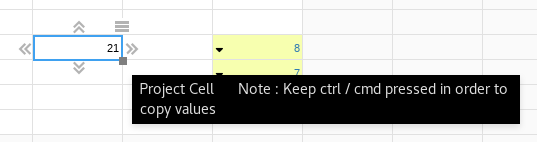
| Ctrl + project a cell (using the square handle or projection arrows) | In a non-formula cell, it copies values across instead of projecting them.
|
| Ctrl + Arrows | |
| Will extend your current selection to the last populated cell in that direction. You can always use Shift+Arrows to adjust your selection cell by cell. | |
| Shift + Arrows | Select ranges. |
| F4 (on Windows)
or Ctrl + d (on Mac) |
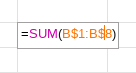
Will cycle through all the combinations of locked and unlocked references when you are editing a formula and the cursor is on a particular reference.
|
| F2 | Edit cell |
| Ctrl + k | Opens the cases panel |
| Ctrl + i | Opens the information panel |
| Ctrl + g | Opens the goal seek panel |
| Ctrl + f | Opens the format panel |